








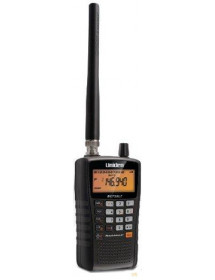
Bearcat BC-75XLT available 300 channels (ten banks 30) scanner with great features.
The frequency range is 25-54, 108-174, 400-512 MHz and Uniden has these Close Call ® RF capture technologies that instantly tune to signals from nearby transmitters. Priority Scan Function scans channels you have identified as priority channels. A delay in a feature that helps prevent missed responses during 2-conversations. There are ten bank services with preset frequencies:
Weather, police, firefighters/emergency, marine, racing, civilian aircraft, amateur radio, railroad, CB and more (FRS/GMRS/Murs). Other features include keyboard input, headphone jack, key lock, weak battery alert, battery savings.

Safe shopping

Fast delivery

Hassle-free return of goods
The frequency range is 25-54, 108-174, 400-512 MHz and Uniden has these Close Call ® RF capture technologies that instantly tune to signals from nearby transmitters
Bearcat BC-75XLT available 300 channels (ten banks 30) scanner with great features.
The frequency range is 25-54, 108-174, 400-512 MHz and Uniden has these Close Call ® RF capture technologies that instantly tune to signals from nearby transmitters. Priority Scan Function scans channels you have identified as priority channels. A delay in a feature that helps prevent missed responses during 2-conversations. There are ten bank services with preset frequencies: Weather, police, firefighters/emergency, marine, racing, civilian aircraft, amateur radio, railroad, CB and more (FRS/GMRS/Murs). Other features include keyboard input, headphone jack, key lock, weak battery alert, battery savings.
The backlit LCD display makes it easy to control the night. The operation is from two AA cells providing freedom in the choice of batteries: alkaline long life or rechargeable NiMH batteries for economy. It is important that you select the correct type of battery through the sliding switch in the battery compartment. NiMH battery type can be charged while in the scanner. NiMH AA batteries can be charged from a USB power supply (such as a PC) or an optional ICM-MW858 USB AC adapter using the included USB cable. Batteries not included.
THE BC-75AT comes with: belt clip, flexible BNC antenna, USB charging cable and printed User's Guide.
Frequency range
25 to 28 in the civic zone
28 - 30 Amateur band 10 meters
30 to 50 VHF Low Band
50-54 Ham band 6 meters
108-137 aircraft band
137-144 Federal Government
144-148 Amateur Belt2 meters
148-174 VHF upper band
400-420 Federal Government
420-450 Amateur Band 70 Cm
450-470 UHF band
470-512 UHF "T" Band
Detailed product description
Hand held scanner, which has memory on 300 channels in 10 banks.
A high-quality overview receiver with excellent sensitivity and a frequency range of 25 to 512 MHz that gives you everything you need to listen to communication on, for example, cb, vhf, uhf, marine and pmr band and 108-136 MHz. Compact design of quality hard plastic is very durable, so you don't have to worry about product life.
You can listen to shipping, air transport, CB or PMR446, Radio amateur traffic, smugglers, couriers and much more.
This scanner also has a plethora of options to manually stop scanning, go to the next active channel, etc.
UBC 75XLT very easy to use once you have programmed interesting frequencies. You can listen to shipping, air transport, CB or PMR446, Radio amateur traffic, smugglers, couriers and much more.
This scanner also has a plethora of options to manually stop scanning, go to the next active channel, etc.
Specifications:
- 300 memories
- debug steps: 5 / 6.25 / 8.33 / 10 / 12.5 kHz
- 7 search banks
- CloseCall function - capture close RF signals
- power supply from 2 enscable Ni-MH batteries or 3V DC
- dimensions Manual33x115 mm
- 175g weight without antenna and battery
Frequency range of the new version:
-------------------------------
- 25-30MHz FM
- 30-88MHz FM
- 108-138MHz AM
- 138-174MHz NFM
- 400-512MHz NFM
Contents of the pack:
- scanner UBC 75XLT
- BNC rubber antenna
- belt clips + tab
- 2x Ni-MH rechargeable batteries or via PC USB cable
- USB cable for charging/powering and connecting to pc!
- manual.
Software:
ARC75 for Uniden BC75XLT
http://info.uniden.com/UnidenMan4/BC75XLT
Video YouTube: BC75XLT Installing the Programming Software
FaQs for Uniden BC75XLT
How to install programming software for BC75XLT - See video
How to program BC75XLT - Watch the YouTube video and the written instructions below.
Instructions for installing the driver for the BC75XLT
How do I fix the cutting of sound in and out?
Turn Off Close Call
Uniden BC75XLT Scanner Programming Instructions
Note: You do not have permission to unblock channels that do not have any items programmed into them. When programming frequencies to the BC75XLT scanner, these channels are automatically unlocked. Follow the steps below for each frequency.
Select a specific channel for programming: In SCAN mode
1. Press HOLD
2. Enter the desired channel (not frequency)
3. Press HOLD
4. Press FUNC
5. Press E
6. Enter the frequency you want to program
7. Press E to save the frequency. Done!
Repeat this procedure to enter additional frequencies
No customer reviews for the moment.

Bearcat BC-75XLT available 300 channels (ten banks 30) scanner with great features.
The frequency range is 25-54, 108-174, 400-512 MHz and Uniden has these Close Call ® RF capture technologies that instantly tune to signals from nearby transmitters. Priority Scan Function scans channels you have identified as priority channels. A delay in a feature that helps prevent missed responses during 2-conversations. There are ten bank services with preset frequencies:
Weather, police, firefighters/emergency, marine, racing, civilian aircraft, amateur radio, railroad, CB and more (FRS/GMRS/Murs). Other features include keyboard input, headphone jack, key lock, weak battery alert, battery savings.